
As social media and our smartphones become more and more integrated with our lives (as if we didn’t have enough of technology already), on-screen texting has also been depicted more often in TV shows and movies, as it’s the primary way many people communicate when they are apart. From just simple over-the-shoulder shots of actual phone screens, many directors have since evolved to presenting the on-screen texting as floating chat bubbles instead, which allows for better visibility and makes the cinematography look smoother as well.
Thus, when I recalled this scene from the hit 2018 movie ‘Crazy Rich Asians’, with many flying bubbles and (literally) crazy animations, I was curious to explore if, and how, it would be localized.
Check out a summary of the project here: https://midd.hosted.panopto.com/Panopto/Pages/Viewer.aspx?id=0a22e4b7-ffbc-4262-8713-ae9d0073191c
Preliminary Research
Original graphics animations: I was curious to find out which studio was in charge of the visual effects animations for this texting sequence, and so embarked to do some searching through Google and social media. After some digging, I was able to find out the name of the studio – Aspect Ratio. On their company website, there is a short blurb about the work they did for the film.
“Through the use of dynamic motion design, the audience sees first hand just how quickly the news of their relationship travels around the world and eventually to Nick’s mother in Singapore. We collaborated with Jon throughout the project to write and design the various text messages, meme’s, emoji’s and gifs present in the sequence.“
In the future, it might be interesting to be able to get their story on how this sequence was conceptualized and executed.
In theaters, how was the film localized for global audiences?
Considering that Crazy Rich Asians was a Hollywood film with Chinese and Southeast Asian / Singaporean references, I am sure there was demand to distribute the films to various markets besides English-speaking ones. I was thus curious to see how this texting sequence was localized, whether the graphics would change.
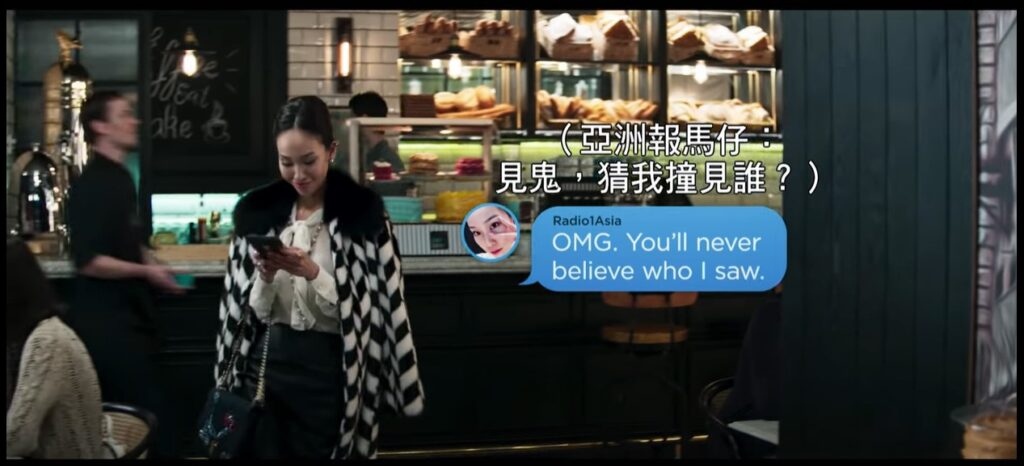
My searches on YouTube turned up this clip by Warner Bros Taiwan of a ‘first-look’ teaser that offers up the texting scene, complete with Traditional Chinese subtitles. Fast-forwarding to the section where the chat bubbles appear, I was slightly disappointed to see standard subtitle treatments, albeit there being some adjustments to the position to sit next to the animated chat bubble. Thus, I wanted to set out to see if I could try localizing this sequence, and examine how smooth or difficult the process would be like.
Challenges
Looking at the scene, I realized that there would be two main challenges to localizing this. Firstly, it would be to replicate the animated chat bubbles which were bouncing, growing, and even spinning as they appear and disappear – most probably to simulate the ‘lifelike’ effect so that the text messages would not look so static. Essentially being motion graphics, some form of rotoscoping or tracking would be needed to hide or at least cover the chat bubbles.
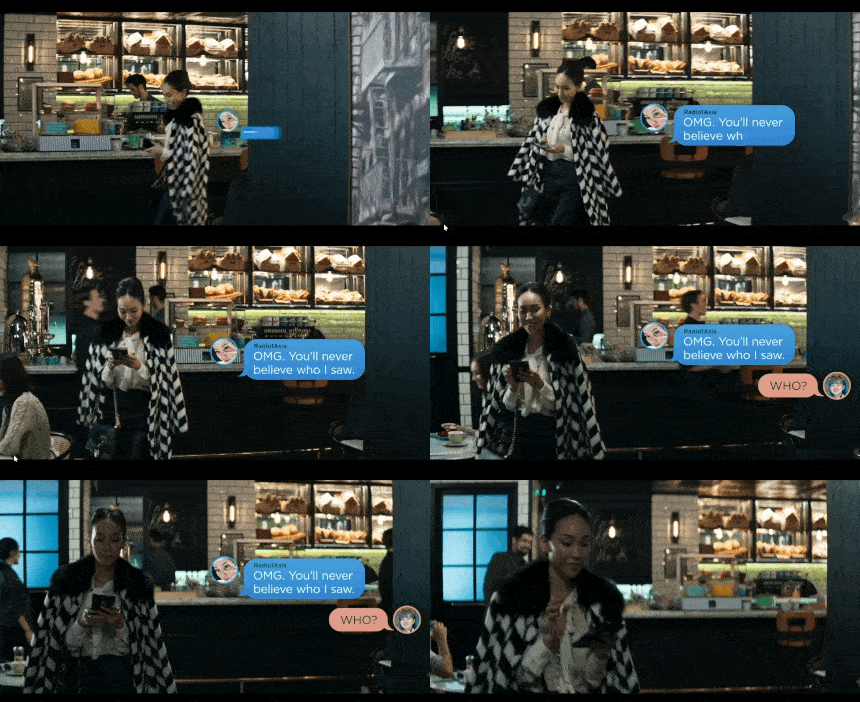
Another challenge was the scene where the girl is walking across the screen, and her body is essentially covering the chat bubble as she moves in a dynamic way. I knew a mask layer would be needed, but thought about how I could align it to the shape of her body.
Process Highlights
With that in mind, here are the main steps I took to localize this sequence:
- Recreated the chat bubbles by extracting the video frames in Photoshop, then creating vector shapes in the exact size of the chat bubbles in the video. This was achieved using a combination of the rectangle tool with rounded corners + pen tool to outline the small tip at the corner. I also matched the same colors of the boxes in the video, including the gradient fill of the blue bubble.

- Keyframe Adjustment: After inserting the bubble back in my After Effects composition, I lined it up with the bubble in the source video, and adjusted keyframes through rotoscoping every 3-5 frames. This allowed me to achieve enough precision in covering the original bubble.
- In order to recreate the lifelike effects, I adjusted the keyframes for Position, Scale. For the bouncing effect, what worked was scaling up from 0 to 105% and back to 100%, and for the spinning effects, I even adjusted 3D Rotation on the x-axis so that my new bubbles would flip as well.
- Live Typing Effect: Adding the text, I made use of Premiere’s Typewriter Effect to simulate the live typing, which was very convenient. I just had to replicate the timing and Scale adjustments in line with how they appear with the bubble.
- Manual Pen Mask vs Rotobrush: In order to hide the text bubble behind the girl as she moves, I first tried using a manual pen mask, which was not very precise as I had to draw the mask using hand-selected points, then proceed to manually move them every 3 frames forward – this did not turn out very precise, and was also rather time-consuming. My second attempt was with the rotobrush tool, which was much more accurate and also saved lots of manual rotoscoping adjustment, turning out to be more efficient.


Lessons Learnt
After getting a closer look at how these on-screen texting bubbles are animated, I realized that this is a way to make the live chats look more lifelike and realistic, instead of seeming static and lifeless to the viewer. Besides replicating it in localization, this is also a technique that can be applied on its own to a brand new video.
As for the flat-video localization aspect, it is true that without the source file, any attempts at flat video localization will require highly-intensive manual work (lots of time and money), so companies will need to consider the tradeoffs in cost versus aesthetic effect. In fact, that might be the reason why the localized version we saw in the beginning was kept in just a plain subtitle format?