This post was completed in collaboration with fellow colleagues Juang-lung Lin and Zhenzhu Zhou.
As translators or proofreaders, we often worry most about the accuracy of our translation and how faithful our word choices are. Thus, other small details in formatting, punctuation and other conventions in translation might go unnoticed. For example, in English-Chinese translation, different conventions in both languages include differences in number formats, use of punctuation, and use of language rules.
Using Regular Expression (RegEx) will be able to enhance the QA Checker function in Trados, to help the translator or proofreader call out possible errors in the translation for such conventions – extremely useful especially in large amounts of text.
Read on to see how to use RegEx in four separate translation scenarios, and follow along with the steps included.
1. Number Formats (Using ‘Find & Replace’)
In English, we use commas in numbers above 999 to assist the reader. They are added after every third digit to the left, e.g. 5,000,000 for five million. In Chinese, we might use the Chinese numerals (‘万’ for ten thousand,‘亿’ for hundred million) in place of large numbers.
However, in specific contexts such as scientific, news or academic research, the exact number without commas is preferred in Chinese. In a large body of text, it might be easy to retype or copy the same number from the English source text without realizing the need to remove commas. With RegEx, you can call out all numbers in your translation to replace them without commas.
| Example Text in Trados (‘Test String’) | [ENGLISH SOURCE TEXT] 5,000,000 people in the world love burgers. 50,900 people in the world love fries. 5,123,500 people in the world love ice cream. 1,500,000,000 people in the world love chocolate. 150 people in the world don’t like chocolate. [TRANSLATED CHINESE TARGET TEXT] 世界上5,000,000人爱吃汉堡。 世界上50,900人爱吃薯条。 世界上5,123,500人爱吃冰淇淋。 世界上1,500,000,000人爱吃巧克力。 世界上150人不爱吃巧克力。 *Notice the numbers in red have commas and need to be replaced. |
Once you have the translation, open up the Find & Replace window (Ctrl+H).
Enter the following into each field.
| Find what: | (\d)\,(\d) |
| Replace with: | $1$2 |
| Look in: | Current Document |
| Find options – Use: | Regular expressions |
Then click ‘Replace’ to check line by line, or ‘Replace All’ for the whole document.

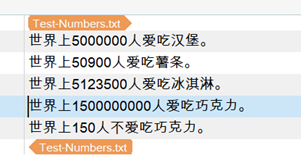
The result should show that the commas have been removed from the numbers. A test on https://regex101.com/ also shows the same result:

2. Time Formats
In English, time is most commonly expressed in the 12-hour format, followed by the acronym ‘AM’ or ‘PM’,e.g. ‘8:00 AM’. In Chinese, no acronyms are used, and instead the time of the day is expressed using a combination of the clock timing and the part of the day, e.g. ‘早上8点’ – ‘8 o’clock in the morning’ or ‘下午4点’ – ‘4 o’clock in the afternoon’.
Using the following regular expression can help you call out any uses in the English source text of time expressed in AM/PM format, including all the different variations they might be written in. You can thus double-check these lines again to ensure they have been correctly translated in Chinese.
| Example Text in Trados (‘Test String’) | [ENGLISH SOURCE TEXT] Amy did not go to her class starting at 8:00 AM. Amy was late for her class that starts at 8AM. Amy reached the school gate at 8.12am. Amy has a meeting at 9:12PM on Monday. The runtime of the full video is 8:30. I am 15 years old this year. |
Once your translation is complete, look for the Verification Project Settings in Trados.
Under the ‘QA Checker 3.0’, look for the Regular Expressions drop-down and enter the following in each field:
| Search regular expressions | (Check the box) |
| Warning | (Choose “Note”) |
| Description | Check for time expressions in English |
| RegEx source: | \d:*\d*\d*.*(AM|PM|am|pm) |
| Condition | Choose “Report if source matches (source check only)” |

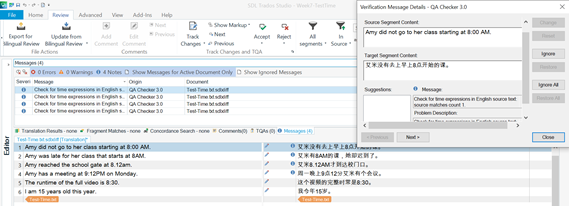
The QA Checker will have a note pop-up for each line in the English source text that has the time expression, reminding the translator to re-look them. A test on https://regex101.com/ also shows the same result:

3. Imperial Measurements in US English
In US English, with the use of the imperial measurement system, another way to indicate feet and inches are by using the single and double quotation marks respectively
– e.g. 5 foot 6 inches can be written as 5’6″.
Depending on the stylistic choice of your translation, you may be required to convert to metric units, or keep the imperial measurements – but in Chinese, the only way to express this is in full units, i.e. 5英尺6英寸.
Using the following regular expression can help you call out any uses in the English source text of measurements written using the quotation marks. You can thus double-check these lines again to ensure they have been correctly translated in Chinese.
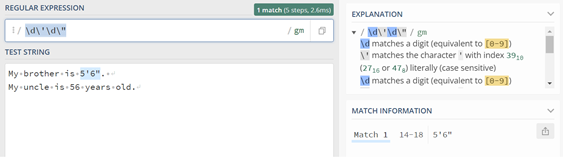
| Example Text in Trados (‘Test String’) | [ENGLISH SOURCE TEXT] My brother is 5’6″. My uncle is 56 years old. |
Once your translation is complete, look for the Verification Project Settings in Trados.
Under the ‘QA Checker 3.0’, look for the Regular Expressions drop-down and enter the following in each field:
| Search regular expressions | (Check the box) |
| Warning | (Choose “Note”) |
| Description | Check for imperial measurements in US English for feet/inch |
| RegEx source: | \d\’\d\” |
| Condition | Choose “Report if source matches (source check only)” |

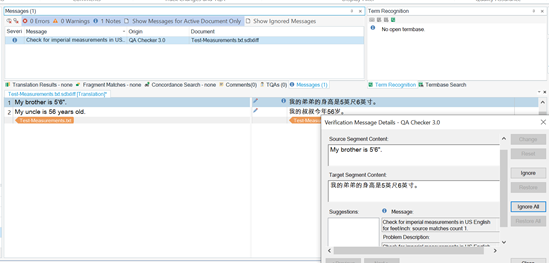
The QA Checker will have a note pop-up for each line in the English source text that has the measurements expressed in quotation marks, reminding the translator to re-look them. A test on https://regex101.com/ also shows the same result:
4. Checking articles in subtitle line breaks
Subtitle translation often has its own set of conventions, such as character limits per line. Another rule that is common for English subtitle translation is to consider where the line break is executed. For example, Netflix’s English Timed Text Style Guide says:

While some of the rules can only be checked by a human translator, you can make use of RegEx to check a common convention – which is the article separated from the noun in the line break. Since there are only three articles in English (a, an, the) it is possible to code this rule into a regular expression.
Using the following regular expression can help you call out any lines that end with a/an/the when they were broken into two lines. You can thus double-check these lines again to ensure the article and noun are not separated.
| Example Text in Trados (‘Test String’) | [TRANSLATED ENGLISH TARGET TEXT] Jennifer wants to try the chocolate cake at Paris Bakery. *incorrect line break Jennifer wants to try the chocolate cake at Paris Bakery. *correct line break Jennifer’s favorite dessert is a cheesecake with strawberry sauce on top. *incorrect line break Jennifer’s favorite dessert is a cheesecake with strawberry sauce on top. *correct line break Jennifer wants to try baking an orange and lemon tart on Sunday. *incorrect line break Jennifer wants to try baking an orange and lemon tart on Sunday. *correct line break |
Once your translation is complete, look for the Verification Project Settings in Trados.
Under the ‘QA Checker 3.0’, look for the Regular Expressions drop-down and enter the following in each field:
| Search regular expressions | (Check the box) |
| Warning | (Choose “Warning”) |
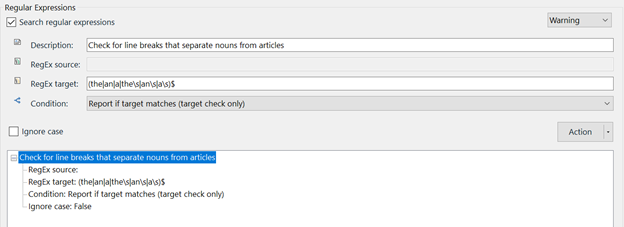
| Description | Check for line breaks that separate nouns from articles |
| RegEx target: | (the|an|a|the\s|an\s|a\s)$ |
| Condition | Choose “Report if target matches (target check only)” |
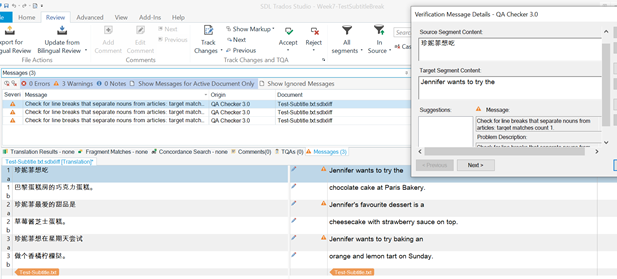
The QA Checker will have a note pop-up for each line in the English source text that has the measurements expressed in quotation marks, reminding the translator to re-look them.
For this example, the test on https://regex101.com/ illustrates the test error better:

In Trados, QA Checker will call out any line segments that end with the English articles, so the translator can correct each line break.